By Mitchel Resnick
Stephen Ocko
Seymour Papert
Media Laboratory
Massachusetts Institute of Technology
Source: Resnick, M., Ocko, S., & Papert, S. (1988). LEGO, Logo, and Design. Children’s Environments Quarterly, 5(4), 14-18.
ABSTRACT
LEGO/Logo is a computer-based environment that aims to bring design and invention activities to the classroom. Using LEGO/Logo, a student can build a machine out of LEGO pieces (including gears, motors, and sensors), connect the machine to a computer, and write a program to control the machine. LEGO/Logo not only provides a meaningful and motivating context for exploring traditional science concepts, but it also allows students to explore design and engineering ideas that are rarely addressed in schools. In this paper, we describe the development of the LEGO/Logo environment, and we discuss the role of design and invention activities in the classroom, drawing on our experiences with elementary-school children.*
*Our research on LEGO/Logo is supported by grants from LEGO A/S and the National Science Foundation. LEGO Systems Inc. now markets a version of the LEGO/Logo system under the product name LEGO TC logo. Logo Computer Systems Inc. implemented the software for this commercial version.
INTRODUCTION
Consider the following scene from an elementary-school classroom. The teacher defines a list of “science words” on the blackboard. Children write the definitions in their notebooks, aware that the words will probably be included on the science test on Friday. Then, the children perform a simple science experiment, carefully following the list of instructions that the teacher has written on the board. Some children get the “right” answer, but they never really understand the purpose of the experiment in the first place. What’s more, they don’t really care.
This scene is, unfortunately, a very common one. Studies have shown that students bring a wide range of misconceptions to the science classroom and they tend to leave with their misconceptions intact (Driver et al., 1985; West and Pines, 1985). Nor do students gain much understanding of the nature of the scientific process (Osborne and Freyberg, 1985). Why this failure? For one thing, school science lessons rarely connect to children’s experiences in the world. Most children view school science as a foreign, irrelevant activity. Science, in the minds of many students, belongs to someone else. It is not part of their world.
Now consider a different scene. Children are huddled together in groups. Some are gathered around tables, others are sprawled out on the floor. Each group is designing and building some type of programmable machine. One group is working on a candy vending machine. Another is building a “robotic dog.” A third group is working on an “alarm-clock bed” that throws its occupant onto the floor at a designated time. The classroom has the feel of an inventor’s workshop. Some children are sketching designs, others are building with gears and motors, still others are programming computers.
This scene is from an elementary school in Boston where we have been developing a new environment that we call LEGO/Logo. Children start by building machines out of LEGO pieces, using not only the traditional LEGO building blocks but newer pieces like gears, motors, and sensors. Then they connect their machines to a computer and write computer programs (using a modified version of the programming language Logo) to control the machines. For example, a child might build a LEGO merry-go-round, then write a Logo program that makes the merry-go-round turn three times whenever a particular touch sensor is pressed.
By building and programming LEGO/Logo machines, children encounter scientific concepts in a meaningful and motivating context. When children want to make their machines move faster, for example, the idea of mechanical advantage assumes a new relevance. It becomes knowledge that the children want and need. In short, LEGO/Logo provides a context in which children care about scientific concepts and connect them to real experiences.
At the same time, LEGO/Logo makes it possible for children to learn about design and invention as fields in their own right. Ideas from these fields are rarely addressed in today’s pre-college curricula. LEGO/Logo fills that gap by allowing children to explore design ideas in two domains: the LEGO building environment and the Logo programming environment. Each of these environments is, by itself, rich with possibilities for learning about design. Each environment allows children to learn about design through the process of actually building things (machines and physical structures in the case of LEGO, programs in the case of Logo). When linked together, as they are in LEGO/Logo, the two environments become even richer. Each environment supplements and reinforces the other.
Consider, for example, the idea of modular design, the idea that complex objects can be constructed out of simple modular units. This idea is an inherent part of both LEGO and Logo. With LEGO, children build machines out of simple plastic building blocks; with Logo, they build programs out of simple procedural building blocks. Thus, with LEGO/Logo, children can experiment with modular design in two different environments, from two different perspectives. And with two examples, particularly with two examples as integrated as they are in LEGO/Logo, children are more likely to recognize and appreciate that there is, in fact, a deeper general principle involved.
TAKING THE TURTLE OFF THE SCREEN
LEGO/Logo builds on several decades of research on computers and children. In the late 1960’s, Seymour Papert and colleagues at MIT developed Logo as a programming language for children. An important early application of Logo involved the “floor turtle,” a simple mechanical robot connected to the computer by a long “umbilical cord.” Logo included special commands like forward, back, left, and right to control the floor turtle. For example, children would type forward 50 to make the turtle move forward by 50 “turtle steps,” or right 90 to make the turtle turn right through 90 degrees.
In his book Mindstorms (Papert, 1980), Papert argued that activities with the turtle could bring children in contact with some of the central ideas of the artificial-intelligence community. In programming the turtle, children can naturally reflect on their own cognitive processes. The turtle thus serves as an important “object to think with”—an object that enables children to think concretely about thinking itself.
With the advent of personal computers, the Logo community shifted its focus to “screen turtles.” With personal computers, children still use commands like forward and right, but these commands control small graphic images on the computer screen, not actual mechanical robots. Screen turtles are much faster and more accurate than floor turtles, and thus allow children to create more complex graphics. Logo is currently used in more than one third of all elementary schools in the United States, typically with an emphasis on turtle graphics.
LEGO/Logo brings the turtle back off the screen, but with several important differences from the early days of the floor turtle. First of all, LEGO/Logo users are not given ready-made mechanical objects; they must build their own machines before programming them. Second, children are not restricted to turtles; they can build and program a wide variety of different types of machines: roller coasters and robots, conveyor belts and candy machines.
The LEGO/Logo system includes new types of LEGO blocks for building machines, and new types of “Logo blocks” for building programs. On the LEGO side, there is an assortment of gears, pulleys, wheels, motors, lights, and sensors. For example, there are optosensors that report when they detect changes in the level of light, and touch sensors that report when they are pressed. The computer communicates with LEGO devices through a custom-designed interface box, which connects to a slot card in the computer. Information flows through the interface box in both directions: children can send commands to LEGO motors and lights, and receive status information from LEGO sensors.
As its programming language, LEGO/Logo uses an expanded version of Logo. Students can use any of the traditional Logo commands and control structures (such as forward, right, if, and repeat), plus any of 20 new commands added specially for the LEGO environment. The new commands include words like on and off for controlling LEGO motors and lights, and words like sensor? for getting information from LEGO sensors.
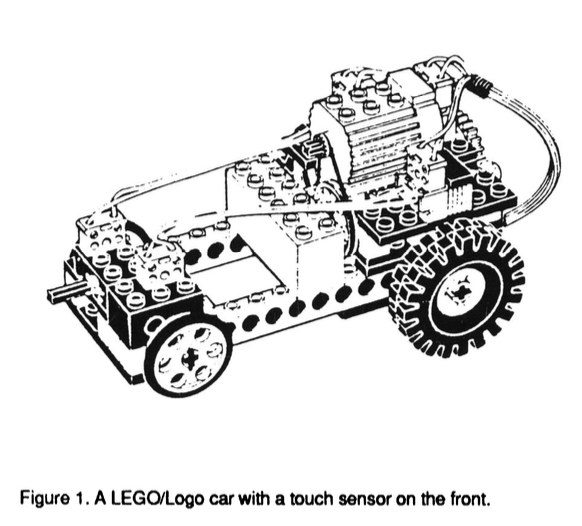
Imagine, for example, a LEGO car with a touch sensor on the front. A student can write a program called car that turns the car on, waits until the car bumps into something, then turns it off. The program would look like this:
to car
on
waituntil [sensor?]
off
end
LEGO/LOGO ACTIVITIES
During the past two years, we tested the LEGO/Logo system with about a dozen elementary-school classes (mostly grades 3-5). Each class used the system for about ten weeks, for roughly three hours per week.
With many of the classes, we introduced LEGO/Logo through a relatively standard sequence of activities. Students started with a simple design activity with no motors, no sensors, and no computer. We set up a ramp in the classroom, and students built LEGO soapbox cars to race down the ramp. As a goal, we suggested that students try to design cars that would travel as far as possible off the end of the ramp.
Through this activity, students became familiar with basic LEGO pieces and building techniques. Equally important, the activity introduced students to some basic principles of experimentation and design. As students modified their cars to make them go further (changing wheel size, changing weight, etc.), we discussed the importance of changing just one variable at a time.
Next, students added gears and motors to their cars and supplied power from a battery box. We suggested that students try different gear ratios to see which combinations were best for going fast on a flat surface, for climbing ramps, and for winning tugs-of-war with other cars. Through these activities, students gained some understanding of transmission systems, mechanical design, and mechanical advantage.
Finally, we added the computer. Students wrote programs to make their cars move in various patterns. Then they added sensors to their cars, and modified their programs so that the cars would, for example, reverse direction when they bumped into obstacles.
After these introductory activities, students worked on “personal projects” of their own choosing. Some continued to work on vehicles (trucks, cable cars, trains), while others moved to different types of machines. Sometimes, the entire class would adopt a theme. In one class, for example, all of the students built and programmed household appliances. The resulting “House of the Future” included a LEGO sewing machine, oven, and pop-up toaster.
We encouraged students to view themselves as inventors. We showed them copies of actual patent drawings for famous inventions (like the Wright Brothers airplane), and we suggested that they keep “Inventor’s Notebooks” to document their own designs. We even established a system of LEGO/Logo patents, awarded to students who appropriately documented their “inventions” through drawings and descriptions.
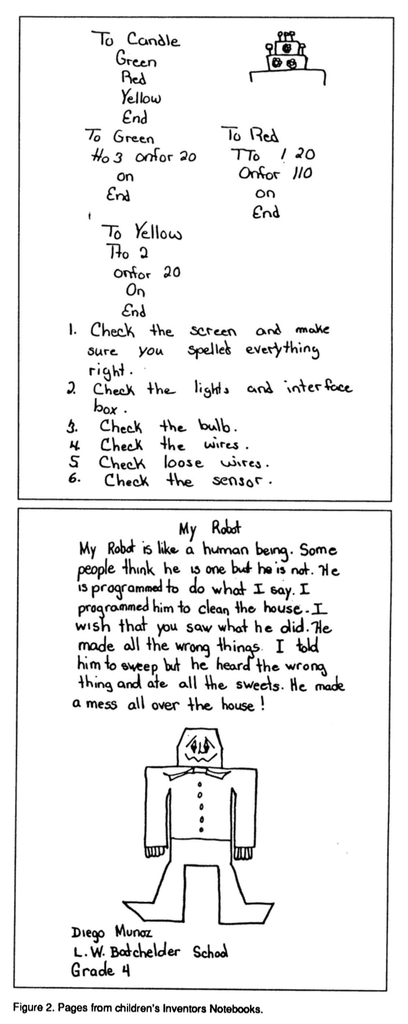
Students used their Inventor’s Notebooks in many different ways. Some students made preliminary sketches of their machines. Others drew careful mechanical drawings of their constructions and wrote elaborate instructions on how to use the machines. Still other students used their notebooks to write stories about their machines. Indeed, we found that LEGO/Logo was a rich environment not only for math, science, and design, but also for language arts, since students were often interested in writing about the machines that they had built.
SAMPLE PROJECT: A VIBRATING WALKER
It is difficult to generalize about LEGO/Logo projects. LEGO/Logo is not a constrained set of activities; students (and teachers) can use it in many different ways. Nevertheless, we attempt to give a flavor of students’ experiences by describing in some detail one particular LEGO/Logo project, developed by a fourth-grade student who we’ll call Kevin (not his real name).
Like many students, Kevin started by building a car out of LEGO. After racing the car down a ramp several times, Kevin added a motor to the car and connected it to the computer. When he turned on the motor, the car moved forward a bit—but then the motor fell off the body of the car and began vibrating across the table.
Rather than trying to fix this bug (or giving up since his car had “failed”), Kevin became intrigued with the vibration of the motor. He began to wonder whether he might be able to use the vibrations to power a vehicle. In effect, he decided to turn the vibrations from a bug into a feature.
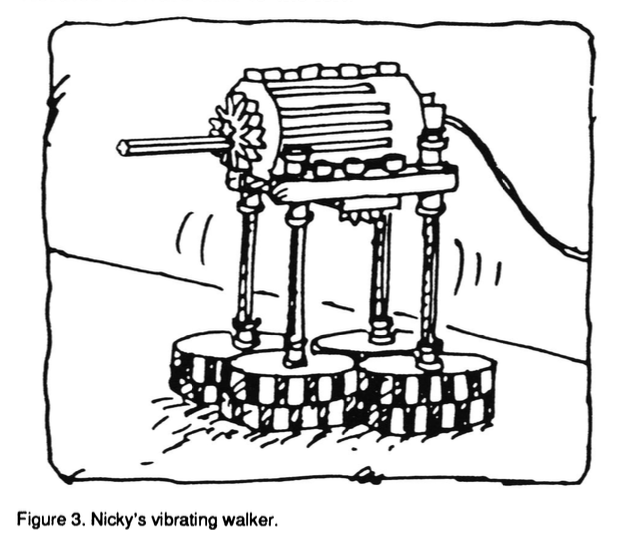
Kevin mounted the motor on a platform atop four “legs” (LEGO axles). After some experimentation, Kevin realized that he needed some way to amplify the motor vibrations. To do that, he drew upon some personal experiences. Kevin enjoyed riding a skateboard, and he remembered that swinging his arms gave him an extra “push” on the skateboard. He figured that a swinging arm might accentuate the vibrations of the motor as well. So Kevin connected two LEGO axles with a hinged joint to create an “arm.” Then he placed a gear on the motor and inserted the arm slightly off-center in the gear. As the gear turned, the arm whipped around—and amplified the motor vibrations, just as Kevin had hoped.
In fact, the system vibrated so strongly that it frequently tipped over. A classmate suggested that Kevin create a more stable base by placing a LEGO tire horizontally at the bottom of each of the legs. Kevin made the revision, and his “vibrating walker” worked perfectly. In fact, Kevin was even able to steer the walker. When the motor turned in one direction, the walker vibrated forward and to the right. When the motor turned in the other direction, the walker vibrated forward and to the left.
Next, Kevin set out to make the walker follow a black line on the table top. He attached a LEGO optosensor (pointing down) at the front of the walker. When the walker passed over a black line, the sensor reported true. With a bit of assistance from us, Kevin wrote the following program to make the walker follow the line. (We have “cleaned up” Kevin’s code and divided it into subprocedures in order to make the program more readable.)
to follow
look-for-line
go-past-line
reverse-direction
follow
end
to look-for-line
waituntil [floor-color = “black]
end
to go-past-line
waituntil [floor-color = “white]
end
to floor-color
if sensor? [output “black]
if not sensor? [output “white]
end
When the follow procedure is executed, the walker veers in one direction until it “finds” the line, continues in that direction until it passes over the line, then reverses the direction of its motor and repeats the process. As a result, the walker weaves back and forth over the line, making a bit of forward progress with each cycle.
What did Kevin learn through this project? For one thing, he gained an introductory understanding of some specific engineering concepts. In building the walker, Kevin ended up with an appreciation for both the constructive uses and the destructive potential of vibration in mechanical systems. And in programming the walker to follow the line, Kevin explored basic ideas of feedback and control. Kevin used these same ideas in a later project, when he programmed a LEGO “turtle” to find its way out of a box.
Equally important, Kevin gained a sense of the process of design. In building the walker, Kevin used an impressive array of design heuristics. These are the “rules of thumb” that good inventors and designers use. Among Kevin’s heuristics:
• Take advantage of the unexpected. When the motor fell off of his car, Kevin did not see it as a sign of failure. He saw it as an opportunity. He was on the lookout for unexpected events, and took advantage of them when they happened.
• Use personal experience as a guide. When Kevin needed to amplify the vibrations of the motor, he relied on knowledge of his own experiences and body movements.
• Try using materials in new ways. The designers of LEGO probably did not envision LEGO axles used as arms or legs. Nor did they imagine that LEGO wheels would be turned 90 degrees and used as feet. But Kevin did not feel constrained by standard usage.
• Collaborate with others. When the vibrations kept tipping the walker over, Kevin was uncertain how to solve the problem. So he consulted with a classmate who had a reputation for mechanical design skills. The collaboration was a success. Such collaborative efforts are particularly important in multidisciplinary activities like LEGO/Logo.
In discussing LEGO/Logo projects, we encouraged students to think and talk explicitly about such design heuristics. In many cases, we believe that LEGO/Logo activities helped students develop a principled approach to design and invention.
BEYOND HANDS-ON
LEGO/Logo is more than a set of materials. Working in classrooms, we have tried to situate the LEGO/Logo materials in a broader learning environment. Thus, LEGO/Logo involves not only bricks and software, but a particular approach to learning and thinking.
In many ways, the LEGO/Logo environment fits in the general trend towards “hands-on” education. Like most hands-on approaches, LEGO/Logo aims to make abstract ideas concrete, allowing children to “learn through their fingers.” But we feel that the LEGO/Logo environment goes beyond traditional hands-on activities in several important ways:
First, the environment involves new uses of familiar materials. Many students enter LEGO/Logo classes with years of experience with basic LEGO materials. Thus, the children find the environment comfortable and non-threatening, even as they explore new ideas and applications.
Second, the environment involves “real” activities. Students create actual working machines, often based on machines they had seen or used in the real world. As a result, students seem to view LEGO/Logo activities as meaningful projects, not as experiments cooked up for classroom consumption.
Third, the environment puts children in control of the design process. In many hands-on lessons, students re-create someone else’s experiment. In LEGO/Logo classes, we encourage children to formulate their own designs, to work on projects that they care about.
Fourth, the environment offers multiple paths to learning. Since LEGO/Logo involves several different types of design, different students are able to approach LEGO/Logo from different perspectives. Students typically start doing something with which they felt comfortable. Some start with mechanical design, others with programming, still others with architectural aesthetics. But children do not stop there. They use their initial “regions of comfort” as a foundation from which to explore other areas—areas that might have seemed intimidating in isolation.
Fifth, the environment encourages collaborative activities. LEGO/Logo projects require many different skills, from programming to structural design to aesthetics. We encourage students to pool their skills. By doing so, children often build projects that are more sophisticated (and more motivating) than what any individual could build alone.
Finally, the environment encourages a sense of community. We encourage groups to share ideas, designs, and actual constructions with one another. We also lead discussions in which students critique one another’s designs. In this way, students get a deeper sense of the way in which real designers go about their work, as part of a community of designers.
FUTURE DIRECTIONS
Our work during the past two years has convinced us of the educational value of LEGO/Logo activities. A broad range of students enjoyed working on LEGO/Logo projects (to the point of wanting to continue working during lunch and after school), and their high level of motivation seemed to pay off in several ways. Not only did students appropriate new ideas about science and design, many seemed to gain a heightened sense of self-confidence in themselves as learners.
To date, however, our observations have been mostly anecdotal. There is a need for more fine-grained studies of the LEGO/Logo environment. Future research could go in many different directions:
• Role of the teacher. As students work on personal LEGO/Logo projects (after the introductory activities), we typically provide only a minimal structure. Clearly, though, we play an important role as catalysts and consultants in the LEGO/Logo activities. Future research could investigate the appropriate roles for teachers in open-ended design activities like LEGO/Logo, and the types of skills that teachers need to fill those roles.
• Differences among students. We are particularly pleased that LEGO/Logo seems to appeal to a broad range of students of both genders; its appeal is not limited to those students seen as “good at math and science.” Different students, though, work on different types of projects, and with different design styles. A study of these stylistic differences could prove interesting—and could lead to new teaching strategies in the classroom.
• New programming paradigms. In programming LEGO/Logo machines, students sometimes want to program more than one device at a time (for example, making one LEGO “animal” chase another). Such concurrent control is not possible (or, at least, it is very difficult) using traditional programming languages. To address this problem, we have developed and tested an extension of Logo that includes concurrent-programming constructs (Resnick 1988).
• Different ages. Most of our work has focused on elementary-school students. In the future, we plan to work with older students on more complex projects. LEGO/Logo could, for example, serve as the base for a high-school course on artificial intelligence and robotics, or as a useful tool within a high-school physics course.
• New sensors and effectors. In most of our work, students have been limited to two types of sensors (touch sensors and optosensors) and two types of effectors (motors and lights). Adding new sensors and effectors would expand the range of possible projects.
REFERENCES
Driver, R., et al. (Eds.) (1985). Children’s Ideas in Science. Milton Keynes, England: Open University Press.
Osborne, R., and Freyberg, P. (1985). Learning in Science: The Implications of Children’s Science. London: Heinemann Publishers.
Papert, S. (1980). Mindstorms. New York: Basic Books.
Resnick, M. (1988). MultiLogo: A Study of Children and Concurrent Programming. Master’s thesis, Massachusetts Institute of Technology. Cambridge, MA: Laboratory for Computer Science.
West, L., and Pines, A.L. (1985). Cognitive Structure and Conceptual Change. New York: Academic Press.